

When New Attendee Registered in HeySummit, create custom welcome message using OpenAI and send it to the user's WhatsApp
When an attendee registers for your HeySummit event, OpenAI writes a welcome message from their registration details and the WhatsApp Cloud API sends it as a text, which only reaches people who have messaged your WhatsApp number in the last 24 hours.
 HeySummit
 OpenAI (ChatGPT)
 WhatsApp Cloud API
3 steps Setup ~5 min Used on 1.1k sites Free to import
What this workflow does
A short personal welcome after someone registers for a virtual summit can tell them what to expect and where to find the sessions. Writing one by hand for each attendee doesn't scale, so this workflow has OpenAI draft it and WhatsApp deliver it.
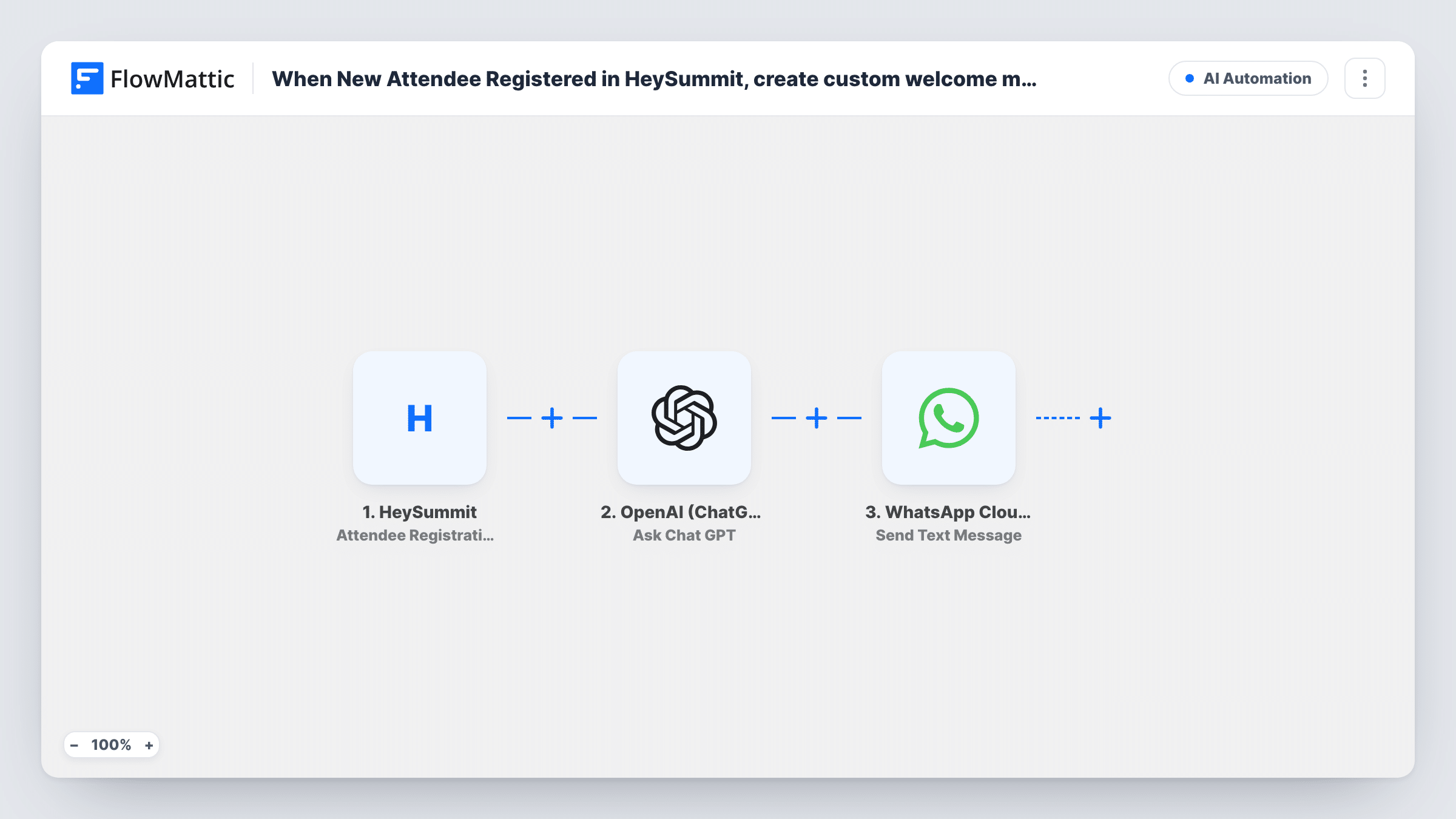
The HeySummit trigger fires when a new attendee registers for an event, and FlowMattic captures their registration data. The OpenAI (ChatGPT) step runs Ask Chat GPT with a prompt you write, built from fields like the attendee's name and the event. The WhatsApp Cloud API step then sends the reply as a text message to the phone number you map.
Be aware of WhatsApp's rules. Free-form text is only delivered within 24 hours of the person messaging your business number, and most new registrants won't have done that, so many will not receive it. For first contact, switch the last step to WhatsApp Cloud API's Send Template Message with an approved template.
Attendees who start on WhatsApp
If your event promotion asks people to message your WhatsApp number before registering, they are inside the 24-hour window and receive the AI-written welcome as text.
A personal note for each summit registrant
OpenAI writes a welcome that mentions the attendee's name and the event, rather than the same line for everyone.
Testing a welcome before moving to templates
Run the flow with your own number to refine the OpenAI prompt, then move the wording into an approved WhatsApp template for wider use.
How this workflow runs
What happens at each step once the workflow is on, and what you need before you import it.
 HeySummit Attendee Registration Started
Fires when a new attendee registers for a HeySummit event. Their registration details are captured for the OpenAI prompt and the WhatsApp message.
- OpenAI (ChatGPT) Ask Chat GPT
Asks ChatGPT to write a welcome message using the prompt you set. Insert attendee and event fields from HeySummit into the prompt and say how long and what tone the message should be.
- WhatsApp Cloud API Send Text Message
Sends the ChatGPT reply as a free-form WhatsApp text to the attendee's number. WhatsApp only delivers it within 24 hours of that person messaging your business number.
What you need
- FlowMatticCore
- HeySummit AccountAccount
- OpenAI (ChatGPT) AccountAccount
- WhatsApp Cloud API AccountAccount
After importing, map your own data. To keep the template universal, not every step is pre-filled. Open each step in the builder and connect your accounts and fields (channels, lists, sheets, recipients) before you switch the workflow on.
Make it yours
Changes worth making after you import it.
- Swap Send Text Message for the WhatsApp Cloud API Send Template Message action with an approved template, so registrants who never messaged you can still receive a welcome.
- Check that HeySummit collects a phone number with the country code, since the WhatsApp step needs one to send to. A test registration shows what the trigger provides.
- Add a Filter after the trigger that continues only when the phone field is not empty, so registrations without a number don't run the OpenAI and WhatsApp steps.
Questions about this workflow
Will every HeySummit registrant get the WhatsApp welcome?
No. Free-form WhatsApp text only reaches people who messaged your business number in the last 24 hours. Use an approved template message to reach new registrants.
Do I need an OpenAI account for the HeySummit welcome?
Yes. The Ask Chat GPT step runs through your OpenAI connection, which you set up after import.
Can I check the AI welcome before it is sent?
Not as imported; the reply goes straight to WhatsApp. Add a Human in the Loop step between OpenAI and WhatsApp if you want to approve each message.
Does the workflow need the attendee's phone number?
Yes. The WhatsApp step sends to a number you map, so the registration must include one. Registrations without a number give WhatsApp nothing to send to.
More AI Automation workflows
Other ready-to-import templates from the same category.






Import this workflow into your WordPress site
Download the JSON, import it from the Workflows screen and connect your accounts. Every run stays on your server, with no per-task fees.
30-day money-back guarantee Unlimited workflows and runs Self-hosted