

When new contact added in Autonami, create a user in WordPress and send him welcome message through WhatsApp
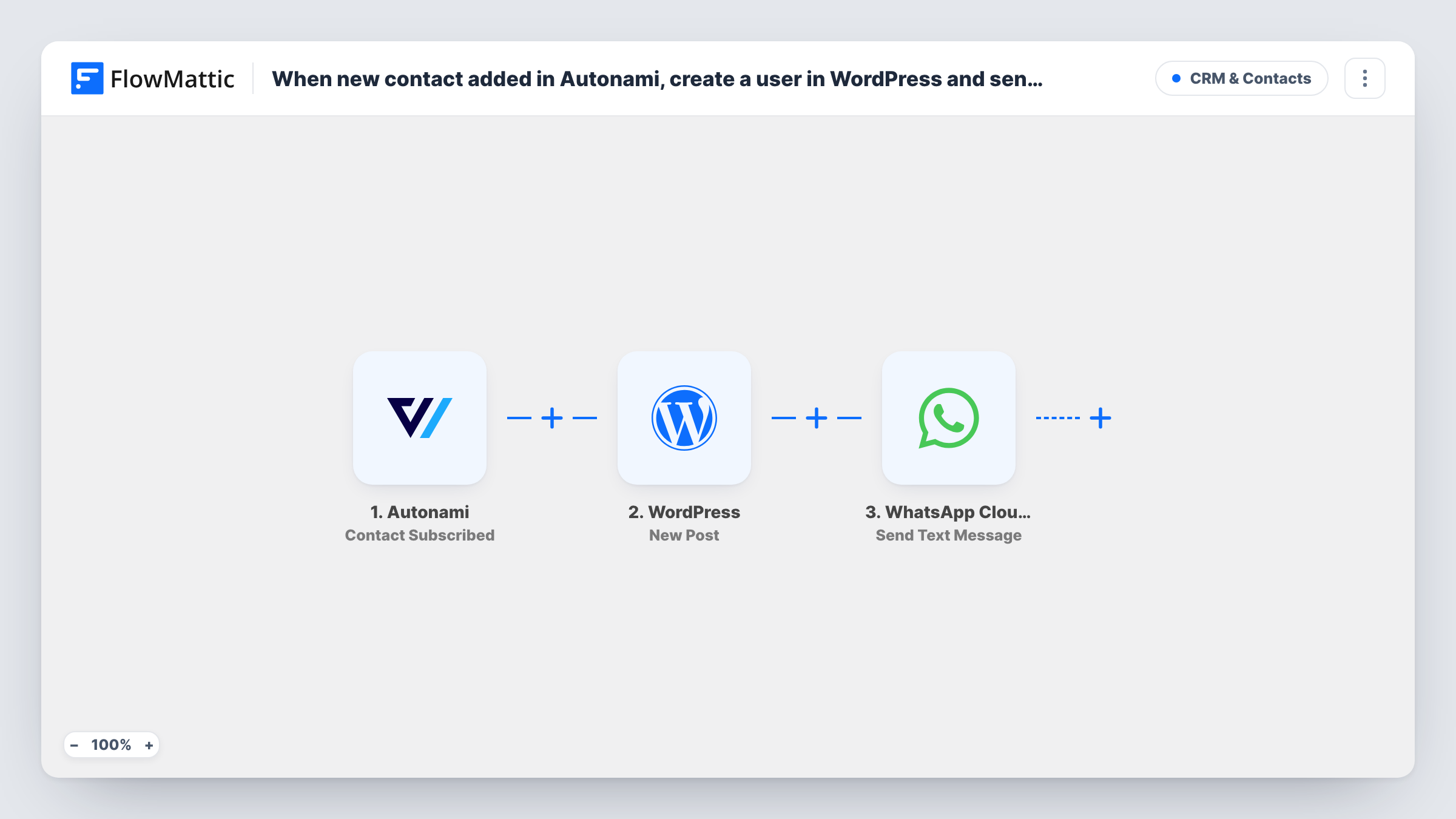
When a contact becomes subscribed in FunnelKit Automations (Autonami), FlowMattic creates a WordPress user account for them and then sends a welcome text through WhatsApp Cloud API to their phone number.
 Autonami
 WordPress
 WhatsApp Cloud API
3 steps Setup ~5 min Used on 722 sites Free to import
What this workflow does
Some sites want everyone who joins their FunnelKit Automations list to also have a WordPress login, for a members area, a resource library or a customer portal. This workflow creates that account when the contact subscribes and greets them on WhatsApp, so you don't add users by hand.
The Autonami trigger is Contact Subscribed. FunnelKit Automations has no separate "contact added" event in FlowMattic, so this is the closest one: it runs when a contact's status becomes subscribed. A contact who unsubscribes and later subscribes again would start another run.
The WordPress New User step creates the account. It ships unmapped, so map the contact's email and name after import. If the email already belongs to a site account, WordPress keeps that one account instead of making another, and the run's Task History entry shows the user ID it returned.
The last step sends a WhatsApp text through WhatsApp Cloud API, also unmapped: map the contact's phone and write your welcome. WhatsApp delivers free-form text only within 24 hours of the person messaging your business number, so new contacts usually won't receive it. Switching to the Send Template Message action with an approved template is the way to reach them.
Members area access for new subscribers
A course creator gives everyone who subscribes through a FunnelKit opt-in a WordPress login to a free resources area.
Customer portal for service clients
An agency adds new clients as subscribed contacts in FunnelKit Automations and each one gets a portal account on the agency's site.
Community sign-ups who chat on WhatsApp
A local club whose members message its WhatsApp number before joining gets them a site account and a welcome text once they're subscribed.
How this workflow runs
What happens at each step once the workflow is on, and what you need before you import it.
 Autonami Contact Subscribed
Fires when a contact's status becomes subscribed in FunnelKit Automations (Autonami). The contact's details, such as email, name and phone, are passed to the next steps.
- WordPress New User
Creates a WordPress user for the contact. The step ships unmapped: map the email and name from the Autonami contact, and check a test run for the user ID it returns.
- WhatsApp Cloud API Send Text Message
Sends a WhatsApp text to the contact. Map their phone number and write the welcome after import. WhatsApp only hands over free-form text inside the 24-hour window after the person last messaged you.
What you need
- FlowMatticCore
- FunnelKit Automations ( Autonami ) PluginPlugin
- WhatsApp Cloud API AccountAccount
After importing, map your own data. To keep the template universal, not every step is pre-filled. Open each step in the builder and connect your accounts and fields (channels, lists, sheets, recipients) before you switch the workflow on.
Make it yours
Changes worth making after you import it.
- Replace Send Text Message with WhatsApp Cloud API's Send Template Message action and an approved template, so contacts who never wrote to you can still receive the welcome.
- To tell new users how to log in, add a WordPress Send Password Reset step between the New User step and the WhatsApp step, mapped to the user ID New User returns.
- Put a Filter between the Autonami trigger and the New User step that continues only when the contact's phone is not empty, if every new account should also get a WhatsApp welcome. Contacts it stops get neither the account nor the message.
Questions about this workflow
What if the Autonami contact already has a WordPress account?
WordPress keeps the existing account rather than adding a duplicate for the same email. Open the run in Task History to see the user ID the New User step returned for that contact.
Will new FunnelKit contacts receive the WhatsApp welcome?
Usually not as imported. Free-form WhatsApp text is only delivered within 24 hours of the contact messaging your business number. Switch to Send Template Message with an approved template to reach new contacts.
Will an Autonami contact who subscribes twice get a second welcome?
Each time a contact's status becomes subscribed, a new run starts, so a contact who unsubscribes and joins again goes through both steps again. WordPress keeps their existing account, but the WhatsApp step sends another text.
Which user role does the new WordPress account get?
No role is chosen in the imported New User step. Check the step after import, and run a test to see which role the account ends up with on your site.
More CRM & Contacts workflows
Other ready-to-import templates from the same category.




Import this workflow into your WordPress site
Download the JSON, import it from the Workflows screen and connect your accounts. Every run stays on your server, with no per-task fees.
30-day money-back guarantee Unlimited workflows and runs Self-hosted