

When new ticket created in Zoho Desk, create task in ClickUp and notify support team via Slack
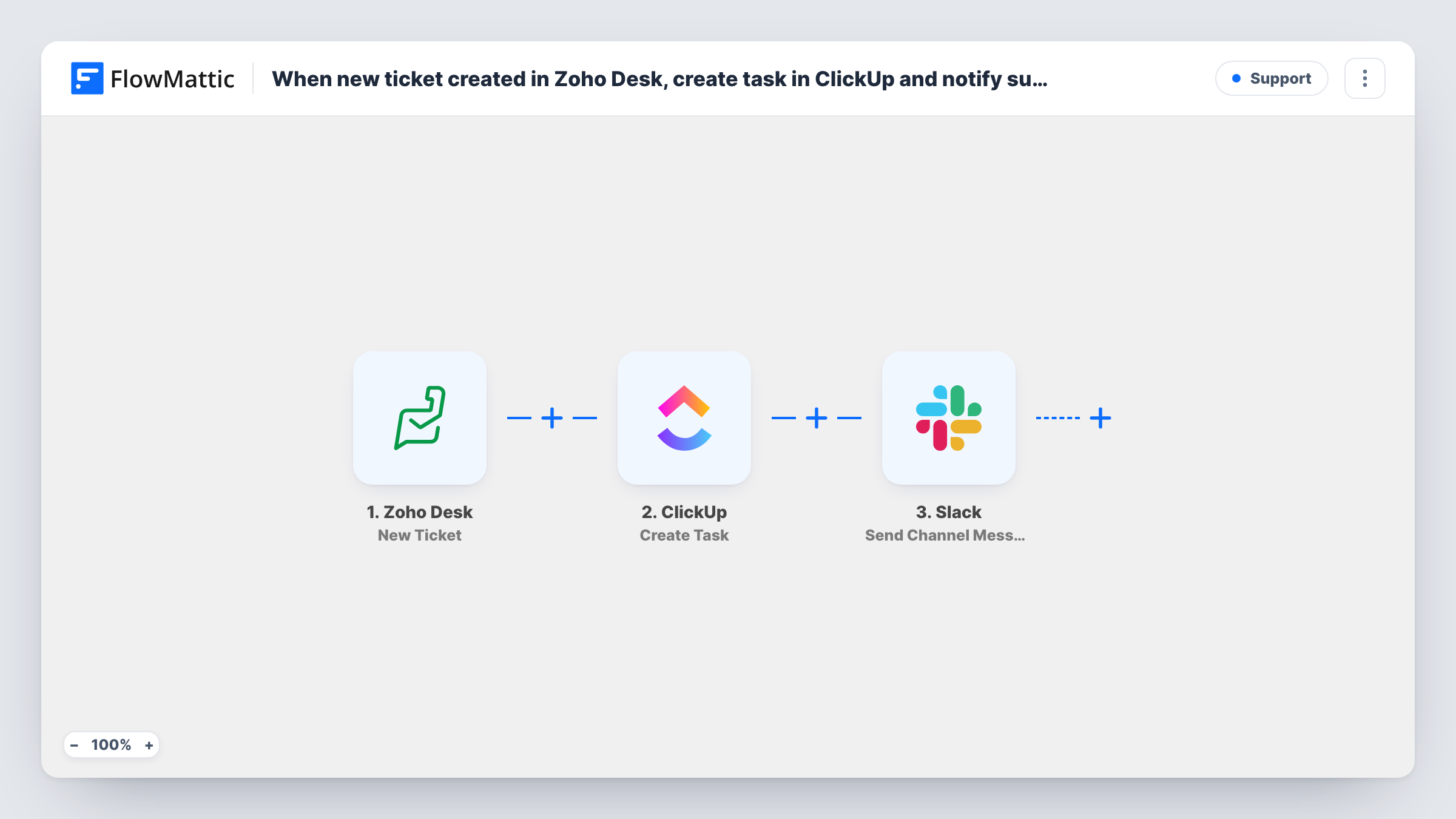
For every new Zoho Desk ticket, this workflow opens a matching task in ClickUp and then posts a Slack channel message, so support work shows up in your project tool and your team chat at once.
 Zoho Desk
 ClickUp
 Slack
Slack3 steps Setup ~5 min Used on 537 sites Free to import
What this workflow does
Some support teams track their work in ClickUp and talk in Slack, while customers write in through Zoho Desk. Copying each ticket into a task and then telling the team by hand is two chores per ticket. This workflow does both as the ticket is created.
The Zoho Desk New Ticket trigger fires when a support ticket is created. FlowMattic passes the ticket's details to ClickUp, where Create Task adds a task built from the values you map, such as the subject as the task name and the description as its text. Next, the Slack step posts to a public channel. Because it runs after ClickUp, the message can include values from the new task as well as from the ticket.
Each ticket produces one task and one message. The ClickUp task is a separate record: closing the ticket in Zoho Desk doesn't close the task. Task History shows what ClickUp and Slack returned for each ticket.
Support work tracked in ClickUp sprints
A SaaS team plans support alongside product work. Each Zoho Desk ticket becomes a ClickUp task in the support list, and Slack tells whoever is on duty.
Technical tickets for developers
Developers live in ClickUp and Slack, not Zoho Desk. They see new tickets as tasks with the customer's description and get a heads-up in their channel.
Agency client requests
Clients raise requests through a Zoho Desk portal. The agency gets a ClickUp task per request and a Slack post the account manager can reply to.
How this workflow runs
What happens at each step once the workflow is on, and what you need before you import it.
 Zoho Desk New Ticket
Fires when a new support ticket is created in Zoho Desk. Its details, such as subject, description and contact, become values you can map into ClickUp and Slack.
- ClickUp Create Task
Creates a new ClickUp task from the ticket. Connect ClickUp and map the ticket subject and description into the task. A test run shows the options the step offers and where the task lands.
- Slack Send Channel Message
Posts a message about the ticket to a public Slack channel. Write the text and insert values from the ticket, and from the ClickUp task if the test run shows them, such as a task link.
What you need
- FlowMatticCore
- Zoho Desk AccountAccount
- ClickUp AccountAccount
- Slack AccountAccount
After importing, map your own data. To keep the template universal, not every step is pre-filled. Open each step in the builder and connect your accounts and fields (channels, lists, sheets, recipients) before you switch the workflow on.
Make it yours
Changes worth making after you import it.
- Add a Filter on the ticket's department or priority between the Zoho Desk trigger and the ClickUp step, if your test run shows those values. Only tickets your ClickUp team handles then create tasks, and the others get no Slack post either.
- Put the Zoho Desk ticket number in the ClickUp task name, so anyone can find the original ticket from the task.
- For a private support channel, switch the last step to Slack's Send Private Channel Message action, because Send Channel Message is built for public channels.
Questions about this workflow
Does closing the Zoho Desk ticket close the ClickUp task?
No. The workflow only runs when a ticket is created. Later changes in Zoho Desk don't update the task, so close it in ClickUp yourself or build a second workflow.
Will the Slack post point the team to the ClickUp task made from the Zoho Desk ticket?
Yes, if the ClickUp step returns the task's link or ID. The Slack step runs after it, so run a test and pick that value when you write the message.
Which ClickUp list does the Zoho Desk task go to?
The one you choose when you set up the Create Task step after connecting ClickUp. Create a test ticket in Zoho Desk and check where the task lands before you turn the workflow on.
Are Zoho Desk tickets created before import sent to ClickUp?
No. Only tickets created after the workflow is on start a run. Existing tickets aren't copied.
More Support workflows
Other ready-to-import templates from the same category.




Import this workflow into your WordPress site
Download the JSON, import it from the Workflows screen and connect your accounts. Every run stays on your server, with no per-task fees.
30-day money-back guarantee Unlimited workflows and runs Self-hosted