

When order paid in SureCart, generate blog post based on the prompt using OpenAI and create a new blog post in WordPress
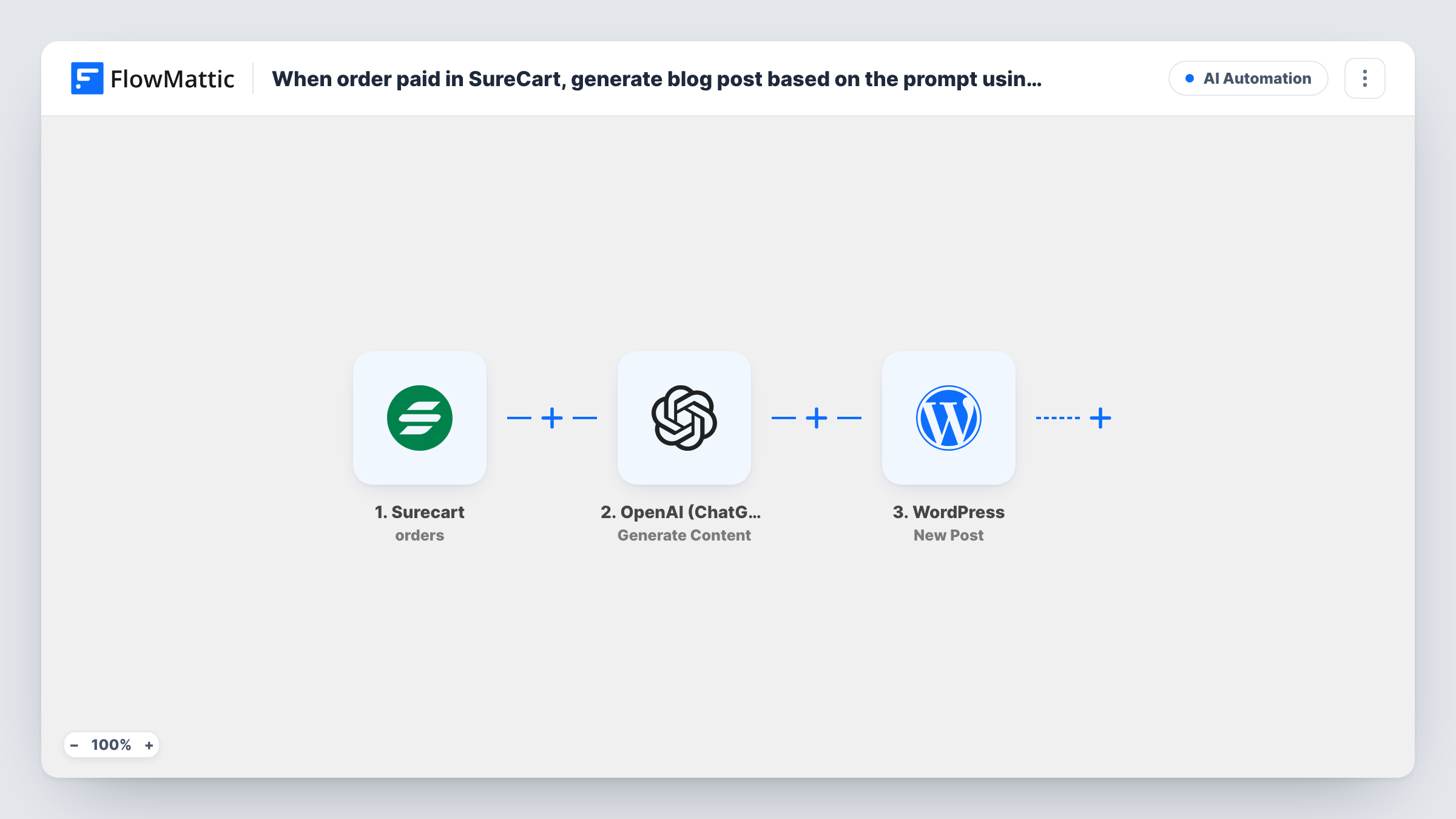
Each time a SureCart order is paid, OpenAI writes a blog post from the prompt you set, and FlowMattic creates it as a new WordPress post on your site with the generated text you map in.
 Surecart
 OpenAI (ChatGPT)
 WordPress
3 steps Setup ~5 min Used on 450 sites Free to import
What this workflow does
Some stores like to turn sales into content: a short post about a newly popular product, a running sales diary, or a thank-you note to the community when an item sells. This workflow uses each paid SureCart order as the cue to have OpenAI draft a post and add it to WordPress.
The SureCart trigger is Order paid, which FlowMattic describes as occurring when an order's status changes to paid. The order data is passed on, so you can use details such as the product name in your prompt.
The OpenAI step runs Generate Content, which produces text from the prompt you provide. The template doesn't include a prompt, so after import you connect OpenAI and write one, for example asking for a short post about the product that was bought. The WordPress step, New Post, then creates the post. Map the generated text into the post content and set a title.
Every paid order creates a post, so a busy store produces many. Keep customers' names, emails and addresses out of the prompt unless you mean to publish them. Read the first few posts the workflow creates before you leave it running, and check Task History for what OpenAI returned.
Product spotlight after a sale
A craft store prompts OpenAI with the product that sold and adds a short spotlight post about it, building a stream of product content.
Sales diary for a small brand
A one-person shop keeps a running blog of what sells, with a short AI-written post per paid order that the owner edits later.
Drafts for a content team to polish
A marketing team uses each sale of a new item as the starting point for a post their editor rewrites before it goes live.
How this workflow runs
What happens at each step once the workflow is on, and what you need before you import it.
 Surecart Order paid
Starts a run as soon as SureCart marks an order as paid. The order details, such as the products bought, are passed on for the prompt.
- OpenAI (ChatGPT) Generate Content
Has OpenAI draft the post text using a prompt of your own. The template ships without one: connect OpenAI and write a prompt that uses order details, such as the product name.
- WordPress New Post
Creates a WordPress post from the generated text. The step ships unmapped: map OpenAI's output into the post content and set a title after import.
What you need
- FlowMatticCore
- SureCart AccountAccount
- OpenAI (ChatGPT) AccountAccount
After importing, map your own data. To keep the template universal, not every step is pre-filled. Open each step in the builder and connect your accounts and fields (channels, lists, sheets, recipients) before you switch the workflow on.
Make it yours
Changes worth making after you import it.
- Keep customer names, emails and addresses out of the OpenAI prompt and the post, since the post can be public on your site.
- Put a Filter between the SureCart trigger and the OpenAI step that continues only for one product, so posts are written only when that item sells.
- Ask OpenAI for a title on its own first line, or add a second Generate Content step for the title, so each post gets a fitting heading.
Questions about this workflow
Will a busy SureCart store end up with a post per order?
Yes. Each order that changes to paid starts a run, and the run creates a post. Add a Filter between the trigger and the OpenAI step if you only want posts for some orders.
Do I need an OpenAI account for this?
Yes. The Generate Content step uses your OpenAI connection in FlowMattic, so connect your account before you test the workflow.
Is the generated post published straight away?
It follows whatever you configure in the WordPress step. Run a test order and check the post that appears in WordPress before you leave the workflow on.
Can I include order details in the OpenAI prompt?
Yes. Map values from the SureCart trigger, such as the product name, into the prompt. Avoid personal customer data if the post is public.
More AI Automation workflows
Other ready-to-import templates from the same category.





Import this workflow into your WordPress site
Download the JSON, import it from the Workflows screen and connect your accounts. Every run stays on your server, with no per-task fees.
30-day money-back guarantee Unlimited workflows and runs Self-hosted