

Route form requests to the right PDF template
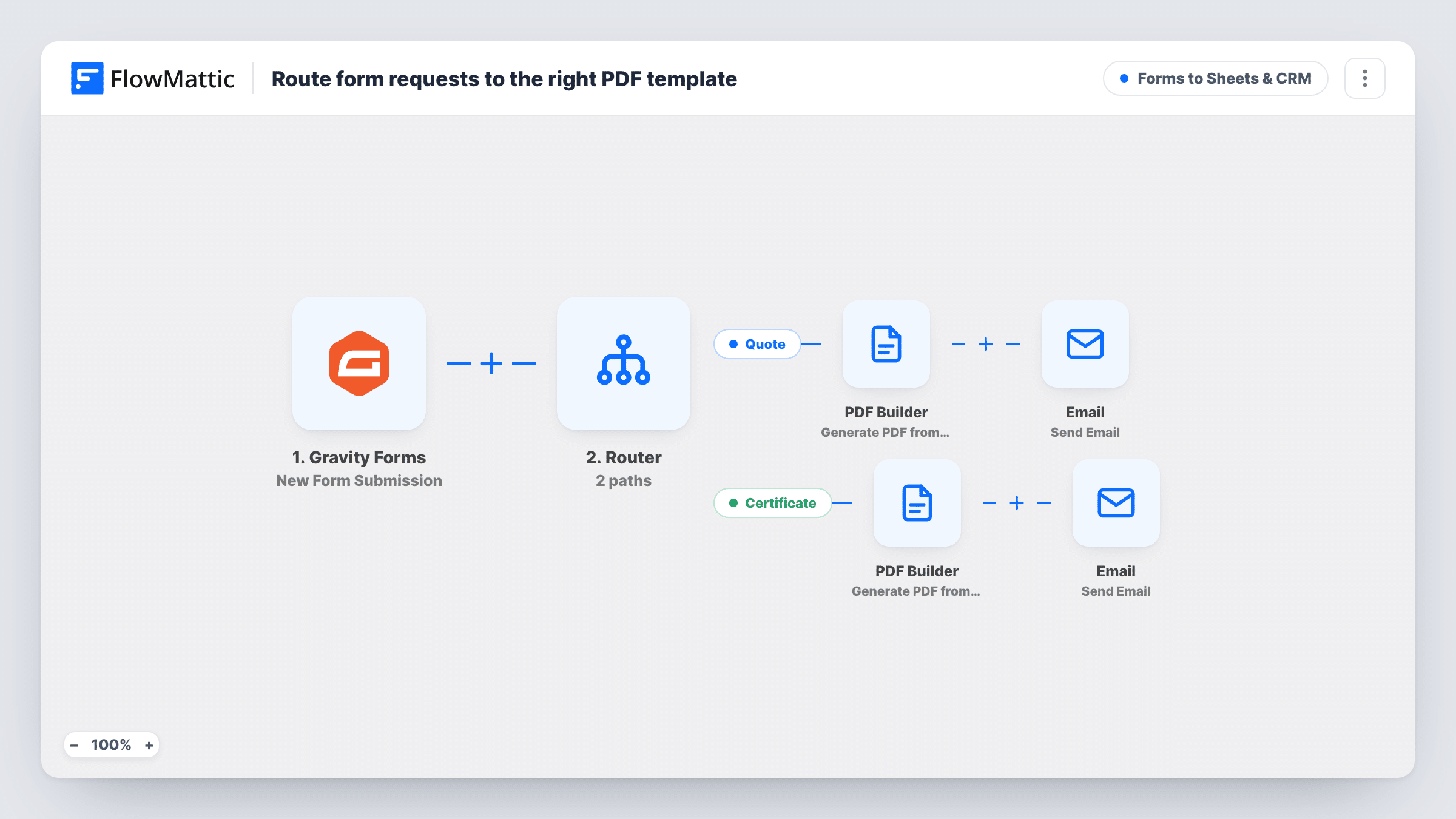
One Gravity Forms intake form, two kinds of document: a Router reads the requested type and renders either a quote or a certificate with PDF Builder, then emails the PDF link to the person who asked.
 Gravity Forms
 Router
 PDF Builder
 Email
Email6 steps Setup ~12 min Used on 2.0k sites Lead Capture Free to import
What this workflow does
Running a separate form for every document you produce gets messy. With one Gravity Forms form and a field that says which document is wanted, you can keep a single intake and still send the right file. This workflow branches on that field and handles quotes and certificates in their own way.
The Gravity Forms trigger fires on each submission. A Router then checks a field called doc_type. Its Quote route continues only when the value exactly matches quote; its Certificate route only when it exactly matches certificate. Because one value can't equal both, each entry follows the route its value matches. On either route, PDF Builder renders a PDF named after the document type and the person's name, and an Email step sends the link to the address on the form.
If doc_type holds anything else, or is empty, neither route runs and no email goes out. Both PDF steps ship pointing at template 12 from the author's site, so choose a quote template and a certificate template of your own after import.
A training company's single request form
Prospects ask for a course quote and past students ask for a completion certificate on the same Gravity Forms form, and each gets the matching PDF.
Event organisers
Sponsors request a sponsorship quote while attendees request an attendance certificate, all from one form on the event site.
Consultants issuing two document types
A consultant offers both project quotes and certificates of completion, and a dropdown on the form decides which one is produced.
How this workflow runs
What happens at each step once the workflow is on, and what you need before you import it.
 Gravity Forms New Form Submission
Runs on each Gravity Forms submission. The template reads fields called doc_type, name and email, so map them to your form's fields after a test entry.
- Router 2 paths
Splits the run in two. The Quote route continues when doc_type exactly matches quote, and the Certificate route when it exactly matches certificate. An entry with any other value runs neither.
- PDF Builder Generate PDF from Template
On the Quote route, renders a PDF from your quote template with the form data mapped in, named quote- plus the person's name, and saves it to the Media Library. Replace the shipped template ID 12.
 Email Send Email
Emails the person on the Quote route with the subject Your quote is ready and a link to the quote PDF. It sends through WordPress mail or the SMTP account set in the step.
- PDF Builder Generate PDF from Template
On the Certificate route, renders a PDF from your certificate template, named certificate- plus the person's name, into the Media Library. Pick a different template from the quote route.
- Email Send Email
Emails the person on the Certificate route with the subject Your certificate is ready and a link to the certificate PDF, using the same mail settings as the quote email.
What you need
- FlowMatticCore
- Gravity Forms PluginPlugin
After importing, map your own data. To keep the template universal, not every step is pre-filled. Open each step in the builder and connect your accounts and fields (channels, lists, sheets, recipients) before you switch the workflow on.
Make it yours
Changes worth making after you import it.
- Use a Gravity Forms dropdown or radio field for the document type with the values quote and certificate, so entries always match one route exactly.
- Adding a third document? Add another route with its own exactly-matches condition on a new value, plus its own PDF Builder and Email steps. Keep each value distinct so no entry matches two routes.
- Attach the PDF instead of sending the link: FlowMattic's Email step can attach files saved on your site, and both PDFs are in the Media Library.
Questions about this workflow
Can one Gravity Forms entry get both a quote and a certificate?
No. The Router runs every route whose condition matches, but the two conditions need doc_type to equal different values, so an entry only ever matches one.
What happens when doc_type is empty or misspelled?
Neither route's condition matches, so no PDF is made and no email is sent. The run shows in Task History, which helps you spot entries with an unexpected value.
Do I need two PDF Builder templates?
Yes, if quotes and certificates should look different. Both steps ship pointing at template 12 from the author's site, so select a separate template in each.
Is the match case-sensitive?
Treat it as exact. The conditions use exactly matches with lower-case values, so set your form's choice values to quote and certificate in lower case.
More Forms to Sheets & CRM workflows
Other ready-to-import templates from the same category.






Import this workflow into your WordPress site
Download the JSON, import it from the Workflows screen and connect your accounts. Every run stays on your server, with no per-task fees.
30-day money-back guarantee Unlimited workflows and runs Self-hosted